Macro recorder · Mac & Windows

Record a macro and replay it in a loop

A free macro recorder for Mac and Windows. Do the job once, the way you always do it, and Green Dotter does it again for you. The auto clicker and mouse jiggler are in the same app.

User feedback
  • “Just want to thank you. I love this app.”

    United States

  • “It does what it promises and has helped me a lot.”

    Brazil, translated

  • “It’s perfect! I love it. You are a life saver.”

    India

  • “Thanks for this good tool.”

    Germany, translated

  • “I really love this app, it’s great and wonderful. I have no complaints!”

    Australia

  • “Well worth it. It met my needs.”

    Brazil, translated

  • “I have nothing bad to say about it. I’ve been using it for about two weeks now, and I love it.”

    United States

Official Green Dotter download

Green Dotter is available two official ways: install from the Microsoft Store, or download it directly from green-dotter.com. No account, email address or subscription is required.

Free. No account required.Mac and WindowsMacros stay on your computer
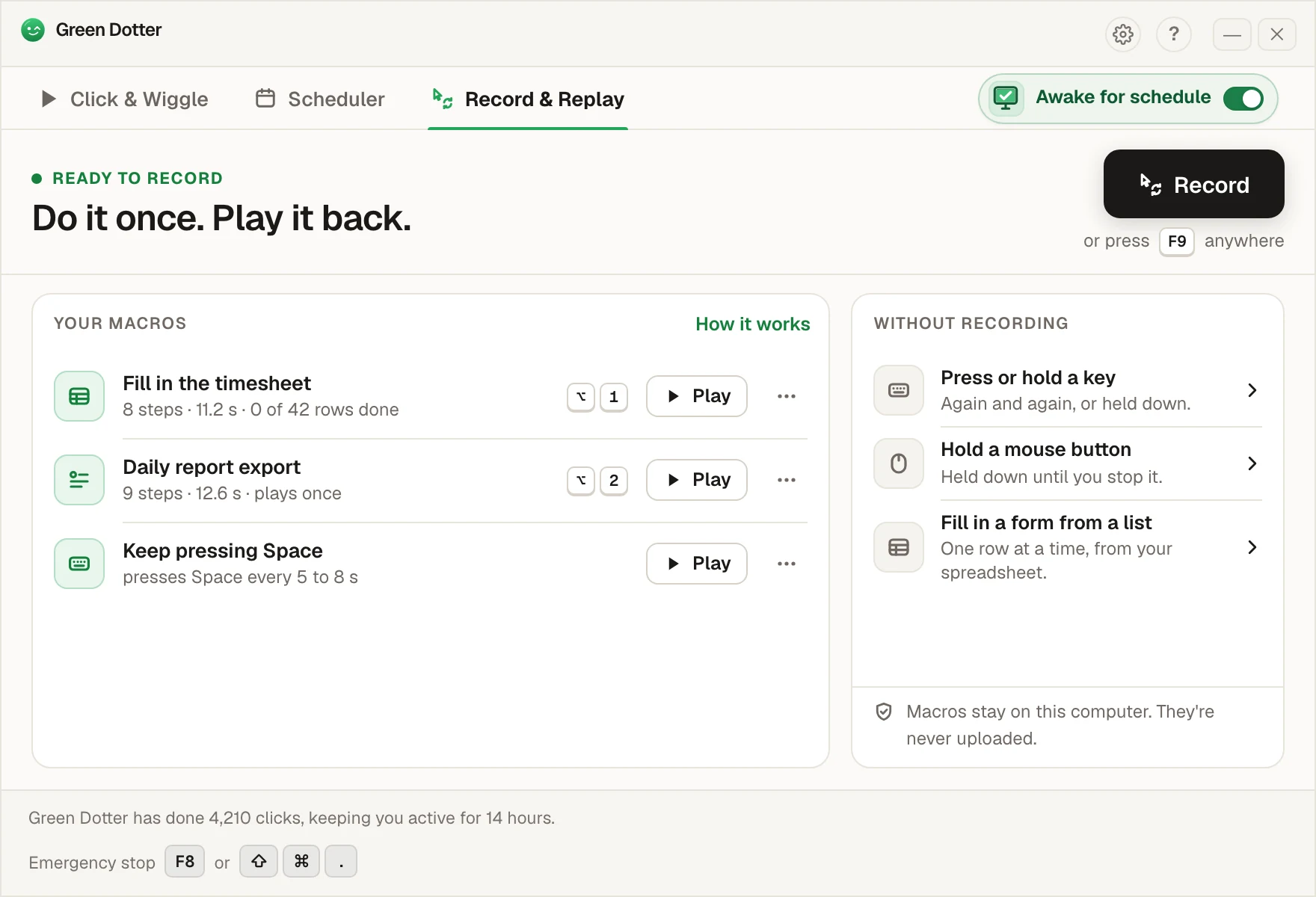
Green Dotter's Record & Replay tab, ready to record, with three saved macros (Fill in the timesheet, Daily report export, Keep pressing Space), each with a Play button.

Record it once.

Press Record, or F9 from anywhere. The window gets out of the way and a red Recording bar shows up. Do the job the way you always do it, then press F8. Every click, scroll and bit of typing turns into a step.

Clicks

Left, right and double clicks, drags and scrolling, with the pauses between them. Where it can, it notes the name of what you clicked, like Save in Chrome.

Keystrokes

Typing becomes a Type step you can read. Shortcuts like Tab or Ctrl+S become a Press step. Password fields aren't recorded.

Fix a step without starting again.

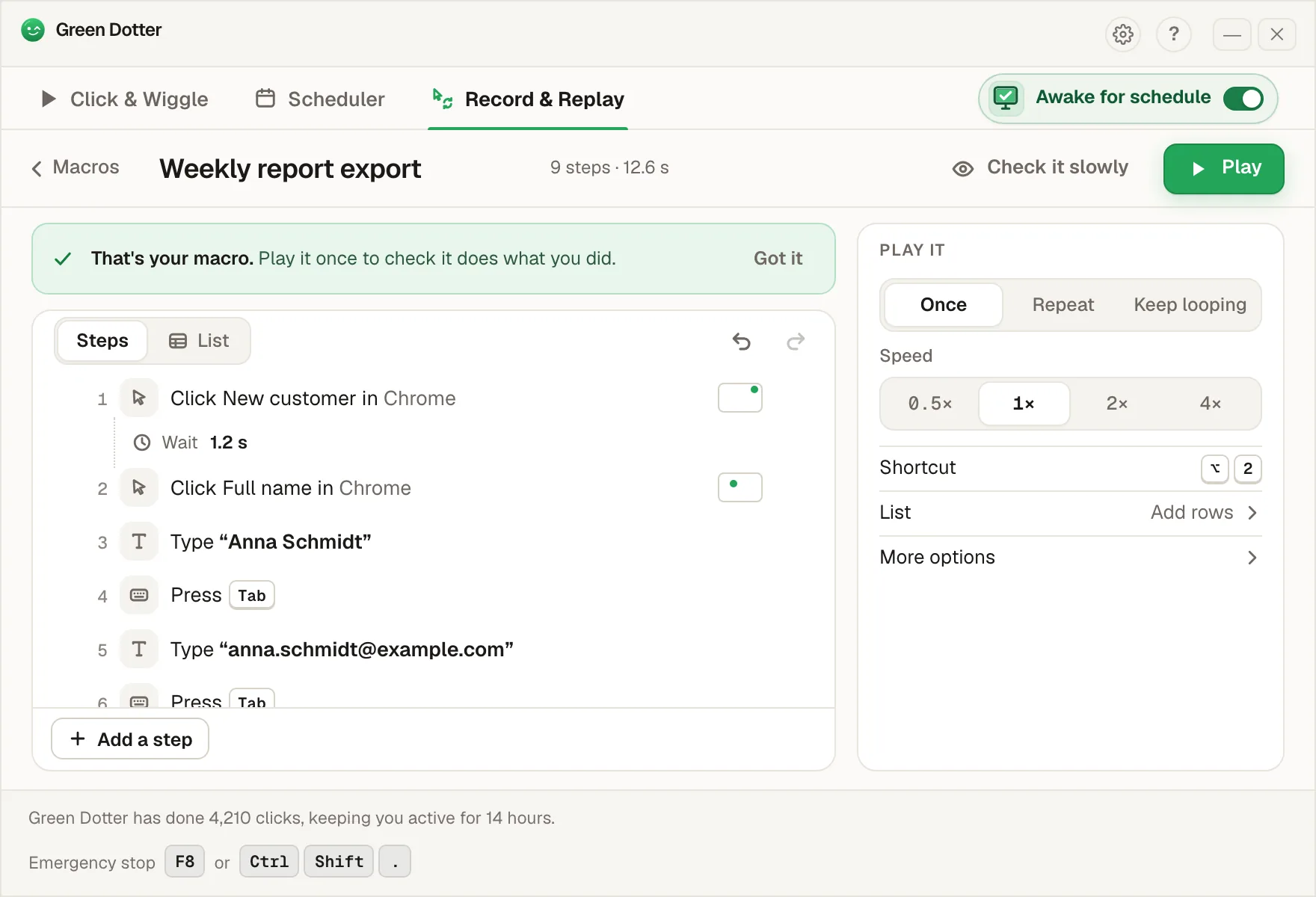
Your recording comes back as a plain list, in words you can read: Click Save in Chrome, Wait 1.2 s, Type the name, Press Tab. Delete a step, change a wait, change the text it types, or add a step in the middle. Got it wrong? Undo.

A macro called Weekly report export, just recorded: nine steps, such as Click New customer in Chrome, Wait 1.2 s, Type Anna Schmidt and Press Tab. On the right, play it Once, Repeat or Keep looping, at 0.5x to 4x speed, with its own shortcut.

Replay it the way you want

Press Play, or the shortcut you gave that macro, and Green Dotter does it all again.

  • Once, a set number of times, or on a loop until you stop it.
  • Faster or slower. Half speed up to four times speed. Or press Check it slowly and watch each step happen.
  • A shortcut per macro, so the one you use most is a key press away.
  • Clicks that follow the window. Moved the window since you recorded? Clicks can move with it.
  • Buttons found by name. If Save has moved, Green Dotter looks for Save. If it can't find it, it clicks where you recorded.
  • Press or hold a key, or hold a mouse button, without recording anything. It works like an auto key presser: pick the key, pick how often.

Grab the mouse and it pauses. Let go and it carries on. F8 stops it dead, whatever's in front.

Pro

When one recording isn't enough

A few extras for bigger jobs are part of Pro.

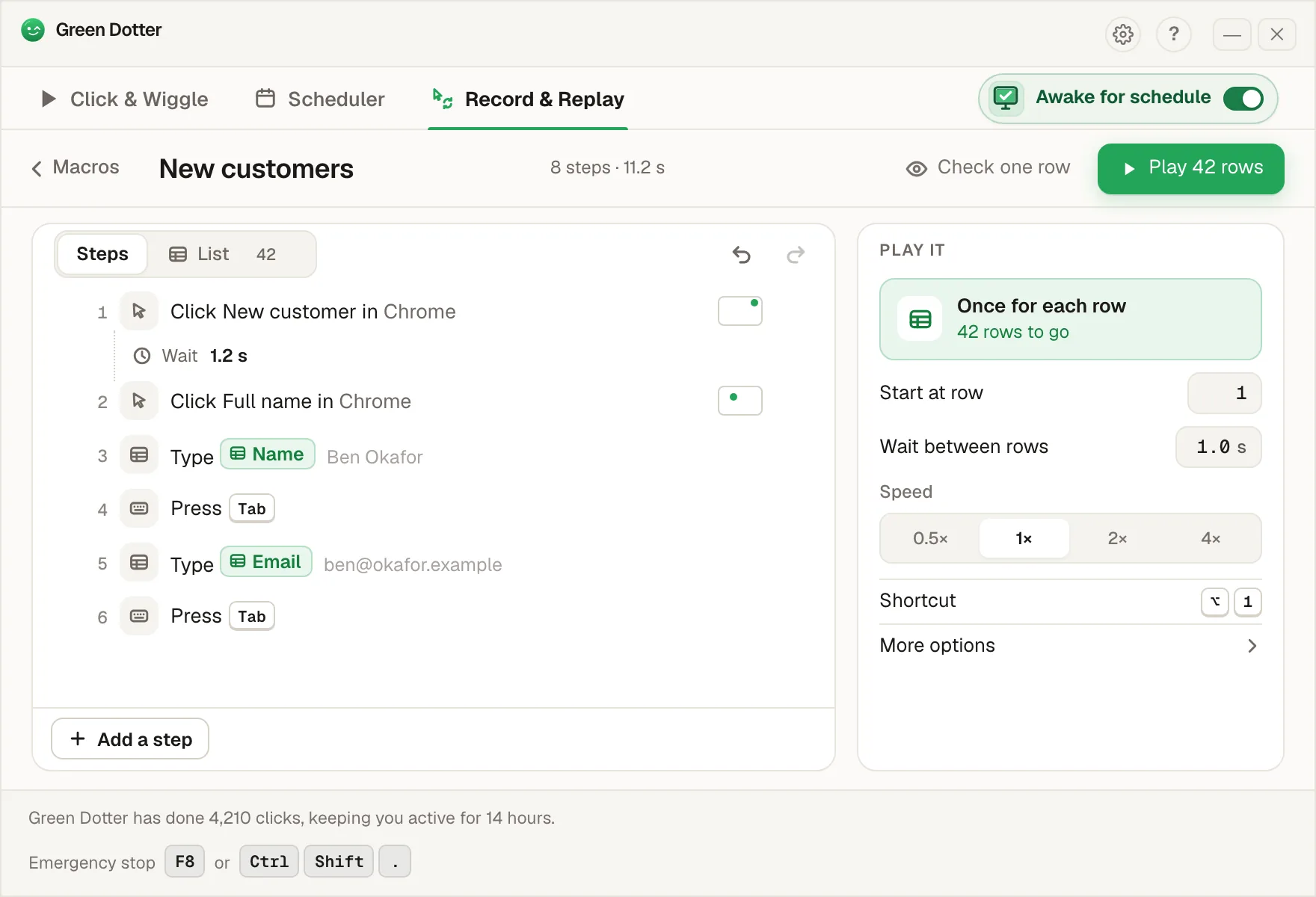
  • Fill in a form from a list. Paste rows from your spreadsheet, record yourself doing row 1, and it does the other 41.
  • Wait for the screen. Instead of a guessed pause, a step waits until part of the screen changes, like a slow page finishing.
  • Schedule a macro to play at a time you pick, on the days you pick.
A macro called New customers that fills in a form once for each row of a 42-row list. Its Type steps take the Name and Email columns, and the Play button says Play 42 rows.

Also in Green Dotter: clicking and wiggling

Record & Replay sits next to the two things Green Dotter already did. Sometimes you don't need a macro. You just need one spot clicked, over and over.

Click. Pick one exact spot, or draw a box and it clicks somewhere inside it, at random intervals in a range you set. More on the auto clicker for Windows and the auto clicker for Mac.

Wiggle. Nothing to pick. The mouse drifts a little, the way yours does while you read, and your computer stays awake. See the mouse jiggler page.

Not sure which one you need? Our guide to auto clickers vs macro recorders explains the difference.

On a Mac, and on Windows

Mac. macOS 11 or later, Intel and Apple Silicon. The first time you record, macOS asks you to switch on two things for Green Dotter: Accessibility, so it can click and type for you, and Input Monitoring, so it can see what you do while you record. It only looks while the red Recording bar is on screen. A wait-for-the-screen step needs Screen Recording too, and only that step asks for it. Here's what the Accessibility permission does. Want the Mac side in more detail? Read macro recorder for Mac.

Windows. Windows 10 and 11. Get it from the Microsoft Store or download it here. Green Dotter skips password boxes when Windows says there is one. Some web pages don't say, so pause the recording before you type a password. Windows won't let it record or click inside a window that runs as administrator.

A macro recorded on a Mac plays on a Mac, and one recorded on Windows plays on Windows. Macros stay on your computer. They're never uploaded.

How it compares

There are good macro tools out there, and some of them do more than this. Here's the honest picture, from their own websites in November 2026.

 Green DotterTinyTaskAutomator (Watch Me Do)Keyboard MaestroJitbit Macro RecorderPulover's Macro Creator
Mac✓✗✓✓✗✗
Windows✓✓✗✗✓✓
Records mouse and keyboard input✓✓✓✓✓✓
Edit a step after recording✓Separate editor downloadPartly✓✓✓
Auto clicker and mouse jiggler built in✓✗✗✗✗✗
Free✓✓✓ Built into macOS✗ Paid✗ Paid✓ Open source

TinyTask is tiny and free, but it's Windows only. Its website lists version 1.77 and still said 2022 when we looked. The normal download just records and plays; editing comes as a separate download. If you're on a Mac and missing it, see TinyTask for Mac.

Automator's Watch Me Do comes with macOS. It's fine for a short job, but plenty of people say it times out or misses its clicks, so try it on something harmless first.

Keyboard Maestro is a full automation kit with triggers and conditions. If that's what you want, it's the better tool. Green Dotter is for people who want to press Record, do the thing, and press Play.

Jitbit Macro Recorder is a paid Windows program with a proper editor, and it can turn a macro into a program you run on its own. Worth a look if you're on Windows and want more control.

Pulover's Macro Creator is free and open source, and it can do a lot. It's Windows only, and its last release on GitHub was version 5.4.1, in September 2021.

Use it responsibly

Green Dotter replays your own clicks and keys. It doesn't hide from anything and doesn't try to. Lots of online games don't allow macros, and some will ban you for using one, so check the rules first. It's built for repetitive work: filling in the same form forty times, exporting the same report every Friday, that sort of thing.

On a work computer, check what your employer and IT allow before you automate anything.

Common questions

A program that watches what you do with the mouse and keyboard, saves it, and plays it back for you. Each saved recording is called a macro.
Not quite. An auto clicker repeats one click. A macro replays a whole run of steps in order. Green Dotter does both, in the same app.
Yes. Typing becomes a Type step and shortcuts become a Press step, alongside the clicks. Password fields aren't recorded on a Mac, and on Windows they're skipped when Windows can tell.
Yes, both. Mac needs macOS 11 or later, Intel or Apple Silicon. Windows needs Windows 10 or 11. A macro plays on the same kind of computer it was recorded on.
Accessibility, so it can click and type for you, and Input Monitoring, so it can see what you do while you record. Screen Recording only if you add a step that waits for the screen.
Yes. On a Mac it's signed and notarised by Apple, and on Windows you can get it from the Microsoft Store. It only watches what you do while the red Recording bar is on screen, and your macros stay on your computer. Here's more on whether auto clickers are safe.
Not on a Mac. Password fields are never recorded. On Windows it skips a password box when Windows says it's one. Some web pages don't say, so pause the recording before you type a password there.
Yes. Play it once, a set number of times, or keep looping until you press F8. You can slow it down to half speed or speed it up to four times.
Press F8, or Ctrl+Shift+. on Windows and ⌘⇧. on a Mac, whatever's in front. Grabbing the mouse pauses it.
On your computer. They're never uploaded.
Yes. Recording and replaying are free, and so are clicking and wiggling. No subscription, no account required.

Get Green Dotter

Official Green Dotter download

Green Dotter is available two official ways: install from the Microsoft Store, or download it directly from green-dotter.com. No account, email address or subscription is required.

Record it once. Let it do the rest.A free macro recorder, auto clicker and mouse jiggler for Mac and Windows. Download it and press Record.